Why a low-impact home office matters
Remote work has become a long-term reality for millions of people. Yet many home offices still resemble improvised corners: uncomfortable chairs, poor lighting, energy-hungry devices and piles of clutter. Beyond productivity and comfort, these choices carry a real environmental footprint: from the electricity needed to power multiple screens to the materials used in furniture and storage.
Designing a low-impact home office means thinking about three key dimensions at once: ergonomics, energy efficiency and clutter reduction. An ergonomic setup protects your health and helps you work longer without fatigue. Energy-efficient equipment and habits reduce your consumption of electricity and associated emissions. A clutter-free space, finally, supports focus while lowering your demand for new objects, storage and replacements.
Rather than a one-time overhaul, it is helpful to see your home office as a small ecosystem you can adjust step by step. The choices you make about furniture, lighting, devices and storage can either lock you into wasteful patterns or gently nudge you towards a more resilient way of working.
Planning the space: orientation, light and air
Before looking at products, it is worth assessing the room or corner where you work. The physical context largely determines how much artificial light, heating and cooling you will need, and how comfortable you will feel after several hours at your desk.
Whenever possible, position your desk to make the most of:
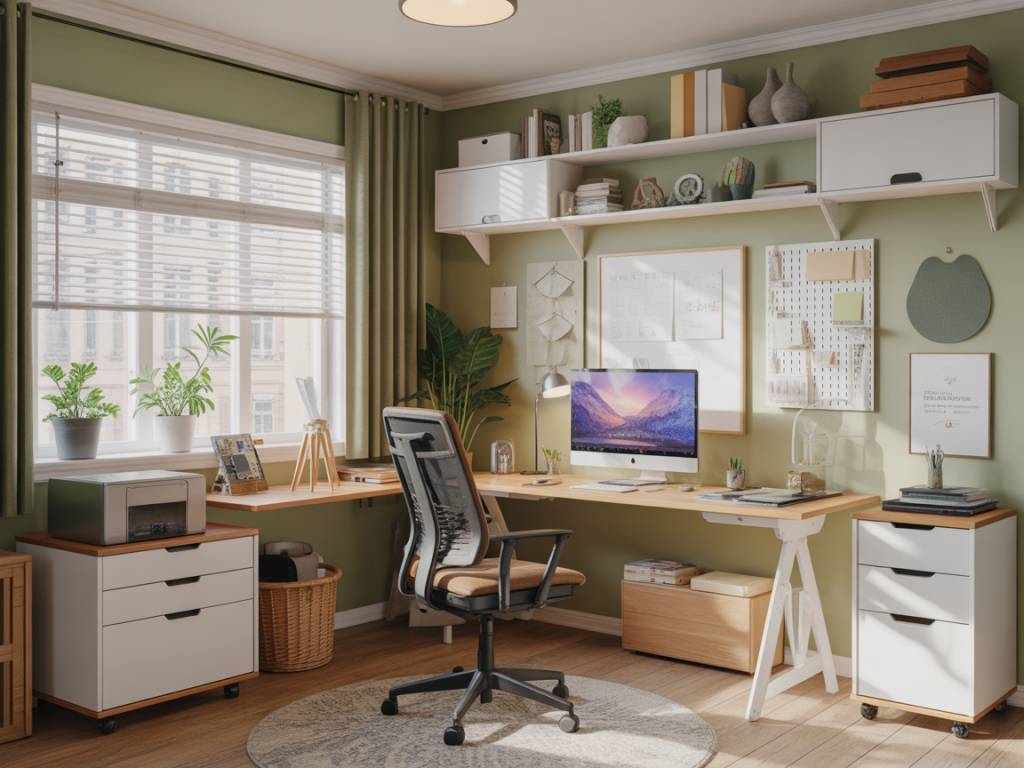
- Natural light: Place your desk near a window, ideally with light coming from the side rather than directly in front or behind you. This reduces screen glare while lowering your need for artificial lighting, especially during daytime hours.
- Natural ventilation: A window that opens allows you to refresh the air without relying solely on mechanical ventilation or air conditioning. Good air quality contributes to cognitive performance and can reduce the temptation to overuse energy-intensive cooling.
- Passive thermal comfort: Rooms with good insulation, shading (shutters, blinds or external shading) and cross-ventilation require less active heating or cooling. Thick curtains, draft excluders and simple sealing strips around windows and doors can noticeably improve comfort.
These low-tech measures often have a better cost-benefit ratio than upgrading to more powerful climate-control devices. The more you can stabilize temperature and lighting passively, the less energy your home office will demand every working day.
Ergonomic furniture with a lower footprint
Ergonomics is often discussed purely in terms of posture and comfort. Yet the environmental profile of desks and chairs—materials, durability, repairability—matters just as much. A chair that breaks after two years, or a desk that cannot be adjusted or reused, represents wasted resources and additional emissions.
When choosing ergonomic furniture for a low-impact office, consider:
- Longevity and repairability: Look for robust frames, replaceable parts (armrests, wheels, gas cylinders) and manufacturers that offer spare components. A durable mechanical structure generally has a lower lifetime impact than a cheaper chair replaced frequently.
- Sustainable materials: Many ergonomic chairs and desks now incorporate recycled steel, responsibly sourced wood (FSC or equivalent labels) or recycled plastics. Solid wood or high-density panels tend to outlast flimsy composite boards, especially for desks.
- Adjustability: A height-adjustable desk—manual or electric—can adapt to sitting and standing, as well as to different users over time. The extra flexibility extends the useful life of the furniture, particularly if your household shares the workspace.
- Second-hand and refurbished options: High-end office chairs and desks are often available second-hand at a fraction of their original price. Refurbished models can combine ergonomic performance with a much smaller environmental cost than newly manufactured items.
An ergonomic setup usually includes:
- a chair with adjustable seat height, backrest and armrests, supporting the natural curve of your spine;
- a desk surface high enough so that your forearms form roughly a 90-degree angle while typing;
- a screen at eye level, either via an adjustable monitor arm or a simple stand, to avoid neck strain.
These fundamentals reduce musculoskeletal issues and make it easier to maintain healthy habits. Once your desk and chair are well chosen, you can add smaller accessories like a footrest or wrist rest if you notice persistent discomfort.
Energy-efficient lighting: seeing clearly with less
Lighting is an obvious, but often underestimated, part of the home office footprint. The goal is to provide sufficient, comfortable light while using as little electricity as possible and minimizing eye strain.
Key strategies include:
- LED over incandescent or halogen: Modern LED bulbs use significantly less energy for the same light output and last much longer. For task lighting, a desk lamp with an adjustable arm and LED bulb is both efficient and adaptable.
- Choose the right color temperature: For offices, bulbs in the 3,000–4,000 K range (warm to neutral white) often balance alertness and comfort. Very cold light (5,000 K and above) can feel harsh for long periods, while very warm light may make you drowsy.
- Layered lighting: Combine ambient light (a ceiling or floor lamp) with focused task lighting on your desk. This avoids intense contrast between screen and surroundings, reducing eye fatigue.
- Smart controls: Simple timers or smart plugs can automatically switch off lights outside working hours. Motion sensors can be useful in shared spaces, though in a home office a manual switch is usually more predictable and less wasteful.
Pay attention to lampshades and reflectors as well: they can direct light where you need it and reduce the wattage required. When possible, place reflective surfaces (light-colored walls, white desks) near your work area to enhance perceived brightness without additional fixtures.
Devices, screens and power management
Your computer, screen, router, printer and other electronics collectively drive most of the operational energy use of a home office. The intensity of this consumption depends not only on what you buy, but also on how you use it.
For lower-impact equipment choices:
- Right-size your hardware: Laptops typically use less energy than desktop computers with separate monitors, especially gaming-oriented machines. If your work is mainly office tasks, coding or light media editing, a modestly powered laptop will usually suffice.
- Efficient monitors: If you need an external screen, look for Energy Star or similar labels, and select the smallest size and resolution that meets your needs. Ultra-wide and high-refresh-rate screens can consume significantly more energy.
- All-in-one devices: Multi-function printers and scanners reduce the number of devices you own. However, question whether you truly need printing capabilities at all; many home offices now function well with digital signatures and cloud storage.
- Refurbished electronics: Buying refurbished laptops, monitors or accessories extends product lifecycles and avoids the emissions of new manufacturing. Choose reputable refurbishers offering warranties and clear grading.
Beyond product selection, power management practices are crucial:
- Enable sleep and hibernation modes on your computer and screen after short periods of inactivity.
- Use a power strip with an on/off switch to fully cut power to monitors, speakers and chargers when you finish work.
- Avoid leaving multiple chargers permanently plugged in; many continue to draw power even without a device attached.
- Where available, use operating system tools to monitor energy use and adjust performance settings accordingly.
These adjustments are modest individually but accumulate over years of remote work. They also encourage a healthier break rhythm, nudging you to stand up and move when the screen goes dark.
Digital minimalism and clutter-free organization
Clutter has both physical and digital forms. In the home office, piles of paper, unused gadgets and tangled cables can be as distracting as overflowing email inboxes or dozens of browser tabs. A low-impact workspace aims to reduce not just the amount of stuff, but also the cognitive load of managing it.
On the physical side, consider:
- Minimalist storage: Rather than large new shelving units, start with what you already own: small boxes, repurposed jars, file folders. Focus on keeping only what you genuinely use for work.
- Vertical organization: Wall-mounted shelves, pegboards or magnetic strips can free up desk space and limit the expansion of clutter. Choosing modular systems allows you to reconfigure as your needs change.
- Paper reduction: Embrace digital versions of documents whenever possible. A simple scanner or scanning app on your phone can convert occasional paper into searchable PDFs, reducing the need for bulky filing cabinets.
- Cable management: Reusable cable ties, clips and under-desk trays improve safety and aesthetics without requiring new plastic-heavy accessories. Label cables clearly to avoid keeping duplicates “just in case.”
Digital clutter also has a footprint, as data centers consume energy to store, process and transmit files. While the impact of one person’s cloud storage may seem small, the cumulative effect of billions of users is significant. Good digital hygiene includes:
- Regularly archiving or deleting obsolete files and emails.
- Unsubscribing from newsletters you no longer read instead of automatically archiving them.
- Choosing cloud services that publish sustainability commitments or rely on renewable energy where possible.
- Backing up important data efficiently rather than maintaining multiple redundant copies scattered across services.
A decluttered space, both physical and digital, often makes it easier to notice what you truly use. This, in turn, reduces impulse purchases of gadgets, stationery and decorative items that may quickly lose their appeal.
Materials, air quality and health
Indoor air quality is central to sustainable remote work, especially when you spend most of your day in the same room. Furniture, paints and flooring can emit volatile organic compounds (VOCs), which contribute to indoor pollution and can affect health.
If you are renovating or gradually upgrading your office, consider:
- Low-VOC finishes: Paints, varnishes and adhesives marked as low-VOC or with reliable eco-labels help reduce airborne pollutants. This is particularly relevant for small or poorly ventilated spaces.
- Natural and recycled materials: Wool rugs, cork boards, bamboo or responsibly sourced wood can replace synthetic options that may off-gas more over time. Recycled-content panels and textiles can also perform well if certified for indoor air quality.
- Plants as complements, not cures: Indoor plants can improve psychological well-being and humidity levels, but they are not a substitute for ventilation. Choose species adapted to indoor conditions and avoid overwatering, which can encourage mold.
Simple habits also matter: regular airing, avoiding scented candles or aggressive cleaning chemicals during working hours, and vacuuming with a HEPA-filter unit if dust is an issue. A comfortable, clean atmosphere reduces headaches and fatigue and makes the office a place where you can genuinely focus.
Habits, routines and small daily choices
The design of a low-impact home office does not end with furniture and appliances. Everyday behavior often determines whether an efficient setup delivers its potential savings and benefits.
Practical habits include:
- Starting and ending the day with a brief reset: clearing the desk, shutting down devices, and opening a window when weather permits.
- Batching tasks that require printing, scanning or intensive computing, so that power-hungry devices do not remain on standby all day.
- Using natural light as much as possible, and consciously turning off artificial lighting when you leave the room.
- Scheduling short movement breaks away from the screen, which improves circulation and reduces the temptation to compensate discomfort with more heating or cooling.
Over time, these routines anchor the physical design of your space into a sustainable daily practice. The office becomes not only a location for work but a small experiment in low-impact living, where comfort, productivity and environmental responsibility reinforce one another rather than compete.
Whether you are assembling a new home office from scratch or improving an existing corner, approaching the process step by step can keep costs and complexity manageable. Start by observing how you actually work, then adjust one element at a time: a more supportive chair, better use of natural light, a power strip you reliably switch off, a small reduction in paper use. Incremental changes, repeated across many days of remote work, quietly shape a workspace that protects your health while minimizing its footprint on the world beyond your walls.